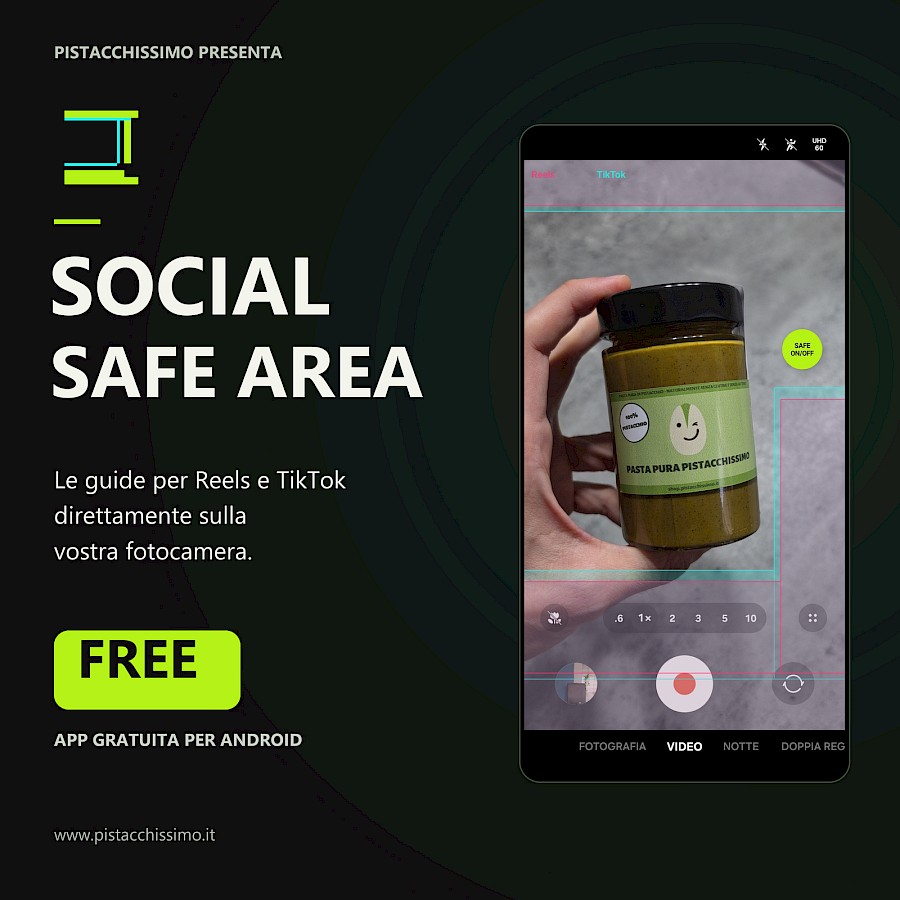
Shoot better videos for your Reels and TikToks on Android with Social Safe Area, my free app: it shows you the safe areas to frame your subject, ensuring a better look on social media. It works with your phone's native camera, keeping all the recording settings and quality you're used to.
I launched Social Safe Area for content creators who want to check their framing while shooting. You can keep using your Android smartphone's camera: the app overlays transparent guides on your screen, leaving your camera controls fully accessible.
Safe areas for Instagram Reels and TikTok: how they work
When you prepare a vertical video, your subject might look great while filming but end up hidden behind the platform's description, comments, or buttons. Safe areas, also known as safe zones, help you understand where to position faces, products, and important details to keep them visible on social media.
You can choose guides for Instagram Reels, TikTok, or both: pink for Reels and turquoise for TikTok. The floating SAFE ON/OFF button lets you show or hide them and can be dragged wherever it's most convenient. You can also adjust the transparency and vertical position of the guides.
The lines are only visible on your screen and are not burned into the recorded video. Social Safe Area does not record footage or re-encode it: recording remains handled by your native camera, with its own resolution and frame rate settings.
APK Download: get Social Safe Area for Android for free
The app is free, ad-free, and requires no registration. It works on Android 8.0 and later, is available in Italian, and can be downloaded from GitHub as an APK file.
Download Social Safe Area for free: APK for Android.
After downloading and opening the file, follow the Android prompts to install it. Open Social Safe Area and grant permission to display over other apps: this is necessary to show the guides over your camera. Choose Reels, TikTok, or both and use the SAFE ON/OFF button to activate them.
If you want the button to appear automatically when you open your camera, you can select it in the app settings and enable the dedicated accessibility service. This feature is optional.
9:16 vertical videos: compatibility and guide adjustment
The reference configuration was verified on a Samsung Galaxy S26 Ultra, shooting in 9:16 vertical format. On other phones, you might need to adjust the guide positions. They serve as a framing reference: the Instagram Reels and TikTok interfaces can change, and horizontal layout is not supported.
The app works without Internet access and does not collect usage data. I have also published the source code: on the Social Safe Area GitHub page, you can find full instructions, report issues, or contribute adjustments for other phones.